Skip to product information
1 of 16

Ora Papers

2026 DIGITAL PLANNER | iPAD PLANNER

2026 DIGITAL PLANNER | iPAD PLANNER

Regular price €26,95 EUR
Regular price Sale price €26,95 EUR
Sale Fully booked
Tax included. Shipping calculated at checkout.
Orientation

This is a Digital Download. No physical item will be shipped.

As this is a digital file, once purchased you will receive an instant PDF to download which is permanent and therefore *no refunds or cancellations can be offered.* By completing your purchase and downloading the digital content, you acknowledge that you waive your right to cancel once delivery has begun.


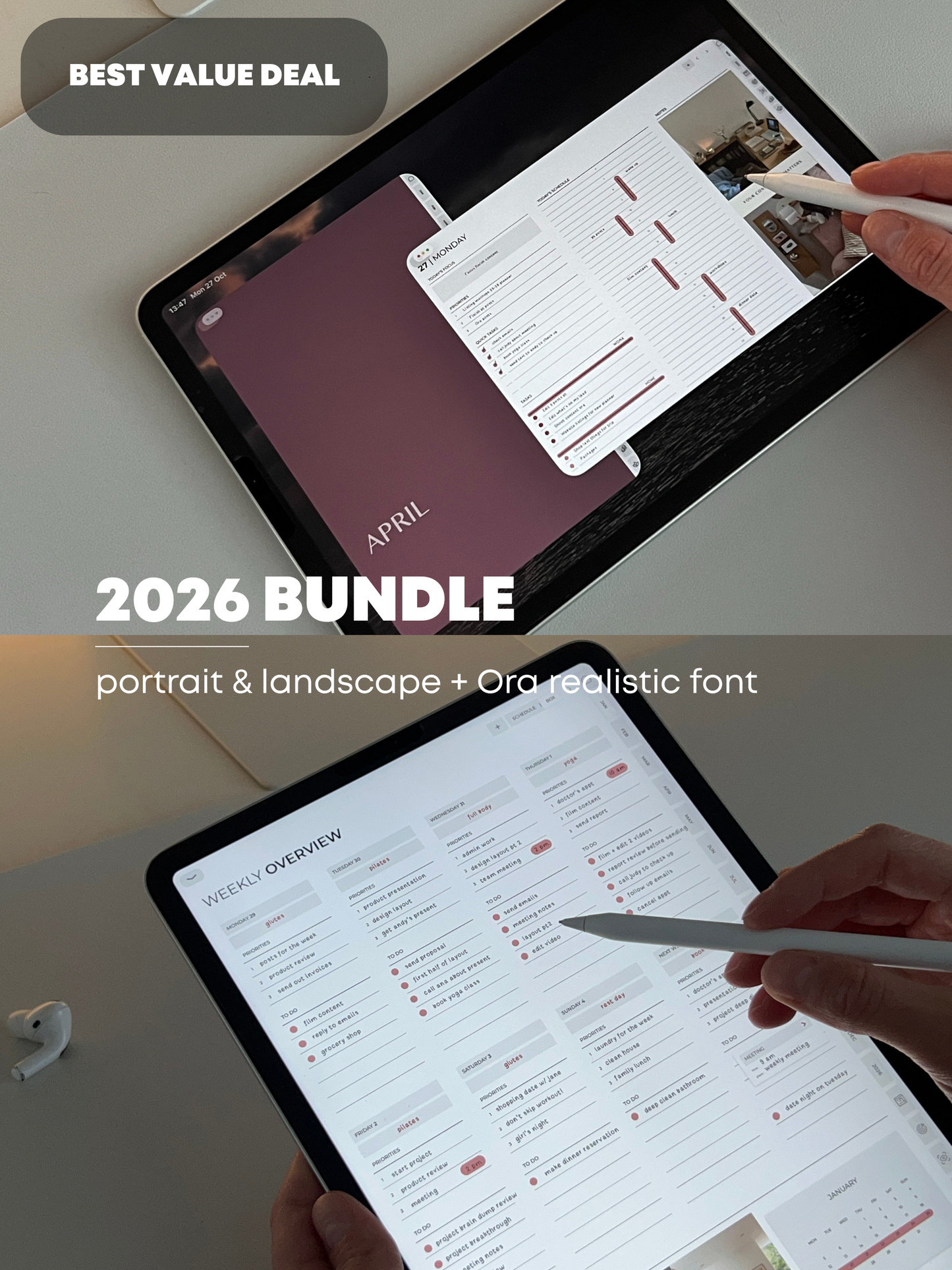
The 2026 Planner was designed to help you organise your everyday - think of it as a way to set your goals, accomplish your tasks and map out your dreams & visions. Practical yet minimal, with no extra fluff! This planner is an aesthetic experience that inspires you towards higher levels of productivity. The digital aspect makes life easy - all the pages, days, weeks & months are hyperlinked, allowing you to navigate the planner quickly and comfortably.

With the Google Calendar, Apple Calendar & Reminders integration, you will be able to add new events & reminders to the corresponding apps right from your planner!*

Compatible with iPhone, iPad & MacBook, using apps like Goodnotes & Notability.

 
* The Apple Calendar & Reminders integrations will only work with IOS devices, as it runs through a shortcut that you will need to install on your device.

_______________________________________________________________

THE PLANNER INCLUDES:

- Monday Start Planner

- Yearly Overview, Key Dates, August-January & February-July overview Pages

- Projects & Goals Pages

- Financial & Wellness tracker Pages

- Vision Board Pages

- January 2026 - December 2026 monthly pages

- Monthly Check in

- Two Weekly Spreads

- Daily Spread

- Side & top hyperlinked tabs

- 4 Hyperlinked Planner Covers 

 _______________________________________________________________

INSTALLATION

Once purchased you will have instant access to your download. Once downloaded, open the file with your app of choice (we use & recommend Goodnotes). Every note-taking app has a “write mode” & “ read-only mode”. To use the hyperlinks, you need to be in “read-only mode”. To then start taking note switch to “write mode”.

To use the Calendars & Reminders integrated in the planner, you will need to first install the OraPapers2026 Shortcut to your IOS device.
First, go to Settings on your device > Shortcuts > Enable Private Sharing (you can disable it after installation) > then install the shortcut by clicking on the link in the Index page of the planner. 


What you will get :

- 1 PDF Download library file containing all your files. In this file you will have access to download your planner, stickers & covers.
Inside is a full installation guide video

_______________________________________________________________

IMPORTANT – PLEASE READ BEFORE PURCHASING

This is a digital download. No physical product will be shipped.

Files are delivered instantly after purchase and provided as a digital planner library, which must be imported into a compatible iPad planning app (such as GoodNotes or similar).

Due to the nature of digital products, all sales are final and non-refundable.

By completing your purchase and accessing the download, you acknowledge that you lose your right to cancel once the digital content has been delivered.

Please ensure this product is suitable for your device and needs before purchasing.

If you have any questions prior to your purchase feel free to message us, we will be happy to help! This item is original to Ora Papers. It is for personal use only, and cannot be resold, remade, copied, redistributed or used for any commercial purposes.

_______________________________________________________________

View full details

More information

How does it work?

  1. You choose your option and complete payment
  2. You receive a short intake form ( submission required )
  3. I design and build your Notion template
  4. You receive your template + a video walkthrough
  5. Small adjustments (if needed)
  6. Project complete

Who is this for?

This service is for individuals or small business owners who:

  • Feel overwhelmed by their current setup
  • Want a clear, structured system
  • Prefer a done-for-you solution
  • Don’t want to build everything themselves

What's included?

  • Up to 5 core pages
  • Clean structure
  • Light aesthetic alignment
  • Video walkthrough
  • 5 day revision window

Everything is delivered asynchronously — no calls required.

What is not included?

  • Live calls
  • Ongoing support or coaching
  • Business strategy or consulting
  • Unlimited revisions
  • Complex automations or advanced systems
  • Full migration of existing data
  • Additional pages beyond scope
  • Resell rights. It is for personal/business use only.

If you need additional pages or features, these can be added as a separate extension.

Availability

This is a limited-slot service to keep the process focused and intentional.

If a slot is available, you can book directly through this page.

Delivery timeframe

7-10 business days after intake form submission.

Pricing

The Notion System Design is priced at €550.

This includes the structured design and development of your custom workspace, delivered as a ready-to-use template.

The scope is clearly defined to ensure a focused and efficient build. Any additional requests beyond the agreed structure may require a separate quote.

Important

Work begins after payment and intake submission.

This is a custom digital service. Payments are non-refundable once work has started. See Terms & Conditions.

It is for personal use only, and cannot be resold, remade, copied, redistributed or used for any commercial purposes.

By purchasing, you confirm that you’ve read and agree to the Terms & Conditions.